安卓开发
实现一个仿QQ的注册界面
- 相对布局RelativeLayout
- 线性布局LinearLayout
- drawable中selector标签的使用(用来实现Button的点击效果)
- EditText的属性标签使用
- TextView的属性标签使用
- ImageView的属性标签的使用
1.设计分析
控件分析
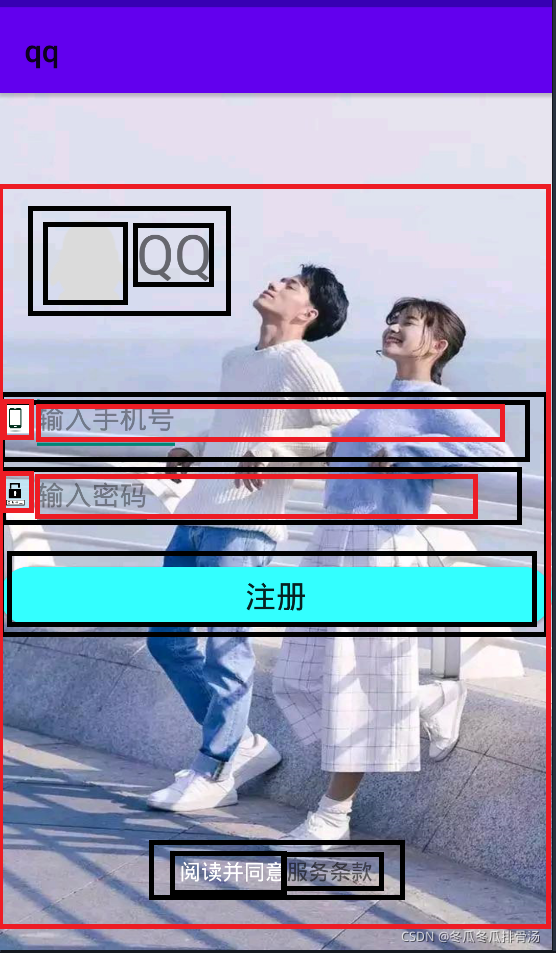
看到的控件 业务功能 实际控件 企鹅图标 无 ImageView “QQ”文本 无 TextView 账号输入框 编辑输入账号(只能输入数字) EditText 密码输入框 编辑输入密码(只能输入数字) EditText 注册按钮 执行注册 Button “阅读并同意”文本 无(颜色为白色) TextView “服务条款” 无(颜色为黑色) TextView 布局分析
使用相对布局大框架中嵌入线性布局
示意图如下:相对布局为红色,线性布局为黑色
2.编程中出现的问题
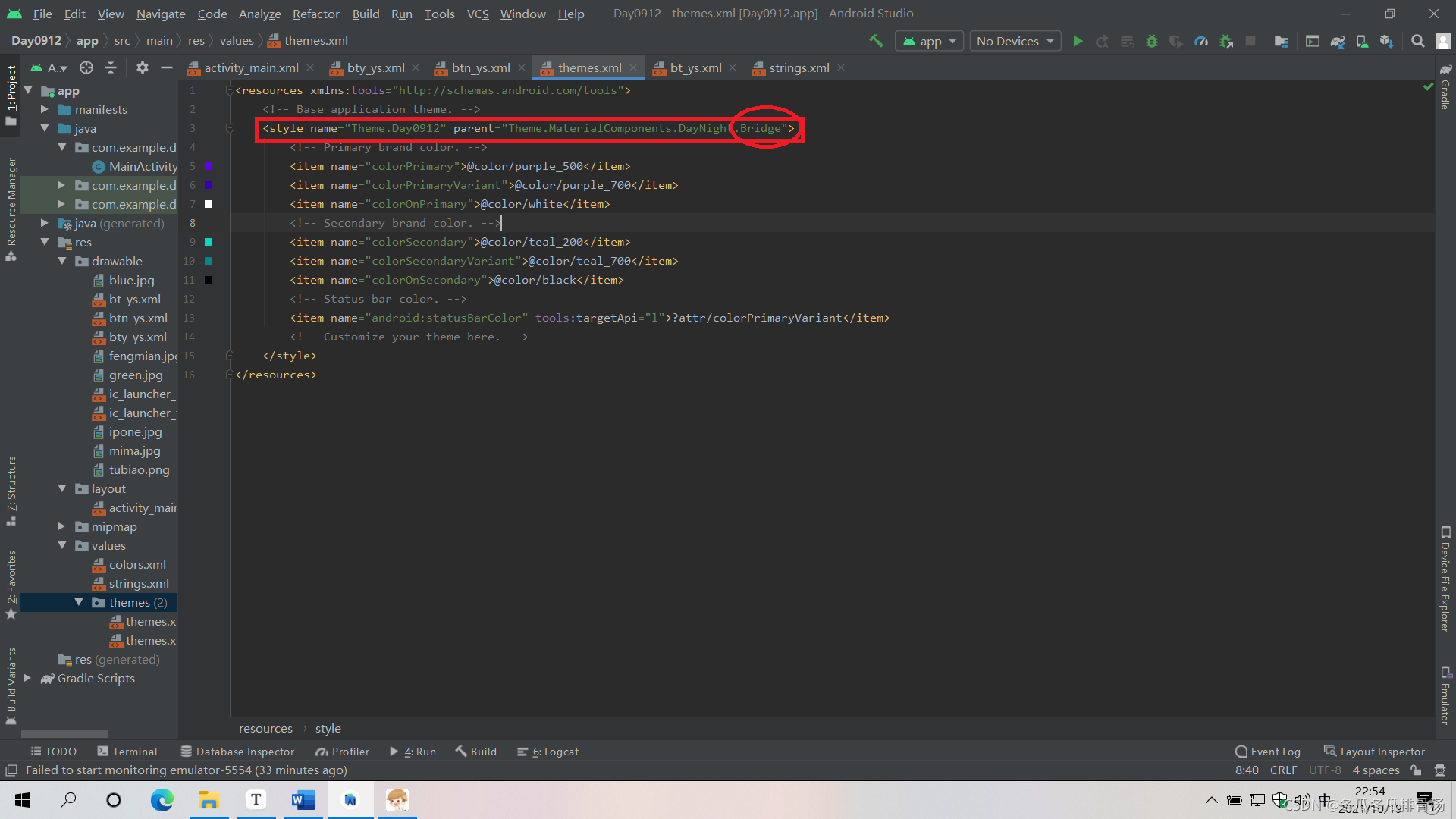
- Button的点击效果颜色没有反应
提示不兼容.(应该是版本问题)
解决办法如下:改为红色圈圈中的Bridge即可
3.Button的点击效果实现
在drawable下面创建一个xml文件:bt_bg.xml
<?xml version="1.0" encoding="utf-8"?>
<selector xmlns:android="http://schemas.android.com/apk/res/android" >
    <!--按下时的图形 -->
    <item android:state_pressed="true"   android:drawable="@drawable/bg2"></item>
    <!-- 松开时的图形 -->
    <item android:state_pressed="false"   android:drawable="@drawable/bg1"/>

</selector>
在activity_main.xml文件中去实现
    <Button
        ....
        android:background="@drawable/bt_bg"
        ....
在颜色点击效果的基础上实现Button的圆角效果
#在drawable下面创建一个xml文件:bt_bg3.xml
    <?xml version="1.0" encoding="utf-8"?>
<selector xmlns:android="http://schemas.android.com/apk/res/android">
    <item android:state_pressed="true">
        <!-- 定义当button 处于pressed 状态时的形态。-->
        <shape>
            <solid android:color="#FF00FF" />
            <!-- 设置按钮的四个角为弧形 -->
            <!-- android:radius 弧形的半径 -->
            <corners android:radius="20dip" />
            <!-- padding:Button里面的文字与Button边界的间隔 -->
            <padding android:bottom="10dp" android:left="10dp" android:right="10dp" android:top="10dp" />
        </shape>
    </item>
    <item>
        <!-- 定义button默认时的形态-->
        <shape>
            <solid android:color="#000000" />
            <!-- 设置按钮的四个角为弧形 -->
            <!-- android:radius 弧形的半径 -->
            <corners android:radius="20dip" />
            <!-- padding:Button里面的文字与Button边界的间隔 -->
            <padding android:bottom="10dp" android:left="10dp" android:right="10dp" android:top="10dp" />
        </shape>
    </item>
</selector>
#xml文件中应用
                    android:background="@drawable/bt_bg3"
activity_main.xml源码如下
<?xml version="1.0" encoding="utf-8"?>
<RelativeLayout xmlns:android="http://schemas.android.com/apk/res/android"
    xmlns:app="http://schemas.android.com/apk/res-auto"
    xmlns:tools="http://schemas.android.com/tools"
    android:layout_width="match_parent"
    android:layout_height="match_parent"
    tools:context=".MainActivity"
    android:background="@drawable/fengmian">   #APP界面的背景图

    <LinearLayout
        android:id="@+id/tubiao"
        android:layout_width="wrap_content"
        android:layout_height="wrap_content"
        android:orientation="horizontal"
        android:layout_marginStart="25dp"
        android:layout_marginTop="80dp"
        android:layout_marginLeft="25dp">

        <ImageView  #左上角QQ图标
            android:layout_width="wrap_content"
            android:layout_height="wrap_content"
            android:src="@drawable/tubiao"/>

        <TextView
            android:layout_width="wrap_content"
            android:layout_height="wrap_content"
            android:text="QQ"
            android:textSize="36sp"/>
    </LinearLayout>

    <LinearLayout
        android:layout_width="match_parent"
        android:layout_height="wrap_content"
        android:layout_marginTop="43dp"
        android:layout_below="@+id/tubiao"
        android:orientation="vertical">
        <RelativeLayout
            android:layout_width="match_parent"
            android:layout_height="wrap_content"
            android:orientation="horizontal">
            <ImageView
                android:id="@+id/mobile"
                android:layout_width="20dp"
                android:layout_height="50dp"
                android:src="@drawable/ipone">    #输入账号的手机图标
            </ImageView>

            <EditText
                android:layout_toRightOf="@+id/mobile"
                android:layout_width="wrap_content"
                android:layout_height="50dp"
                android:hint="@string/input_mobile"
                android:inputType="number">
            </EditText>

        </RelativeLayout>

        <RelativeLayout
            android:layout_width="match_parent"
            android:layout_height="wrap_content"
            android:orientation="horizontal">
            <ImageView
                android:id="@+id/mima"
                android:layout_width="20dp"
                android:layout_height="50dp"
                android:src="@drawable/mima">    #输入密码的密码矢量图
            </ImageView>

            <EditText
                android:layout_toRightOf="@+id/mima"
                android:layout_width="wrap_content"
                android:layout_height="50dp"
                android:hint="@string/input_password"
                android:inputType="number">
            </EditText>

        </RelativeLayout>

        <Button
            android:layout_width="match_parent"
            android:layout_height="38dp"
            android:layout_marginTop="22dp"
            android:text="@string/login"
            android:textSize="20sp"
            android:background="@drawable/bty_ys">   实现Button的点击效果

        </Button>

    </LinearLayout>

    <LinearLayout
        android:layout_width="wrap_content"
        android:layout_height="wrap_content"
        android:orientation="horizontal"
        android:layout_centerHorizontal="true"
        android:layout_alignParentBottom="true"
        android:layout_marginBottom="42dp">
        <TextView
            android:layout_width="wrap_content"
            android:layout_height="wrap_content"
            android:text="@string/login_message"
            android:textColor="@android:color/white"/>
        <TextView
            android:layout_width="wrap_content"
            android:layout_height="wrap_content"
            android:text="@string/service"/>

    </LinearLayout>


</RelativeLayout>
strings.xml源码
<resources>
    <string name="app_name">qq</string>
    <string name="input_mobile">输入手机号</string>
    <string name="input_password">输入密码</string>
    <string name="login">注册</string>
    <string name="login_message">阅读并同意</string>
    <string name="service">服务条款</string>
</resources>